Measure & improve
Integrations
Connect flows to other systems using actions and tools.
Outcome
By the end of this guide you will understand the main ways EBI's AI Studio can integrate with other systems, and how to enable them in flows.
How integrations work in EBI's AI Studio
In EBI's AI Studio, integrations typically happen in one of these ways:
- Take an action: a flow step calls an external system (for example create a case, submit a form, or look up data).
- Handover to an AI Agent: a flow hands the conversation to an agent that can use tools (plan-dependent).
- Allow AI to use tools: controls whether the AI can use tools during response generation (plan-dependent).
Use “Take an action” in a flow
- In the top navigation, select Content.
- Select Flows.
- Open the flow you want to update.
- Select Add bubble and then select Take an action.
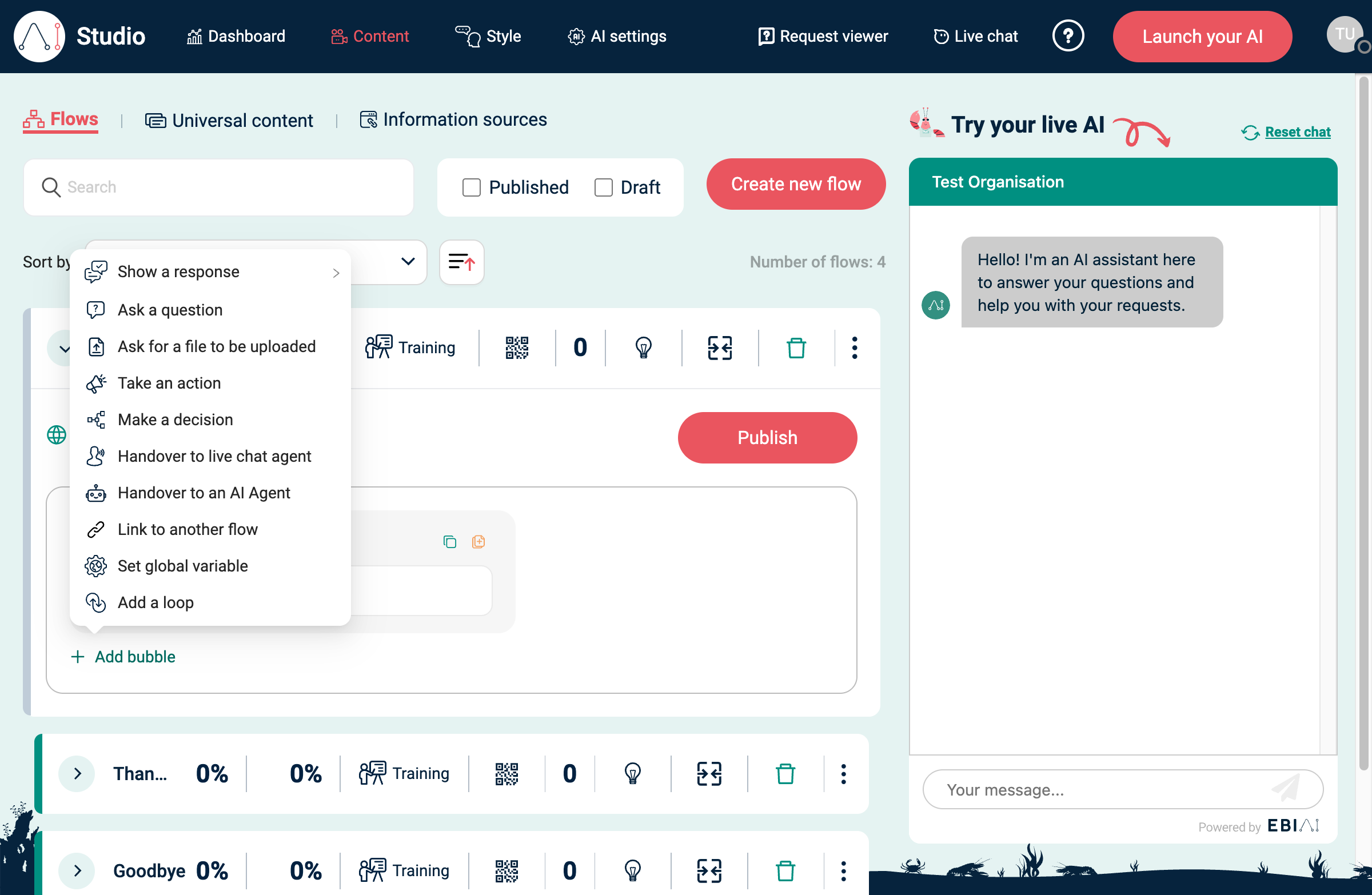
Then (UI may vary by connector):
- Choose the system/connector you want to call.
- Select the operation/event you want to run.
- Map any required parameters (what data to send).
- Test the flow in Try your live AI, then select Publish.
Connector tips (varies by connector)
- OAuth connectors: you may be prompted to sign in and authorise access before you can run an action.
- Detect schema: some connectors include a Detect schema option to discover fields and make them available as variable pills.
- JSON inputs: some action inputs accept JSON. Paste valid JSON (for example an object like
{ "key": "value" }). - Logs: if you see a way to view logs for an action invocation, use it to troubleshoot failures and validate inputs/outputs.
Use tools in an AI Agent (plan-dependent)
If available in your plan, you can add Handover to an AI Agent as a bubble type. Inside the agent bubble you can enable options such as:
- Allow agent to use tools
- Allow agent to search the web
- Remote MCP servers
Enable “Allow AI to use tools” (plan-dependent)
- In the top navigation, select AI settings.
- Find Allow AI to use tools in the response-generation settings.
- Turn it On only when generated responses should be able to use configured tools.
This setting may appear as its own panel after the content-search and web-search settings. If you don’t see it, your plan or role may not include it. For the full settings context, see AI settings.
Best practices
- Use least-privilege credentials.
- Avoid sending sensitive data unless required.
- Test error cases and define a clear fallback message for failures.
- Monitor early usage after publishing.